Blender Marble Run Animation | Physics Simulation & Track Building (Part 1)
عدد الدروس : 1 عدد ساعات الدورة : 00:41:22 شهادة معتمدة : نعم التسجيل في الدورة للحصول على شهادةللحصول على شهادة
- 1- التسجيل
- 2- مشاهدة الكورس كاملا
- 3- متابعة نسبة اكتمال الكورس تدريجيا
- 4- بعد الانتهاء تظهر الشهادة في الملف الشخصي الخاص بك
قائمة الدروس
عن الدورة
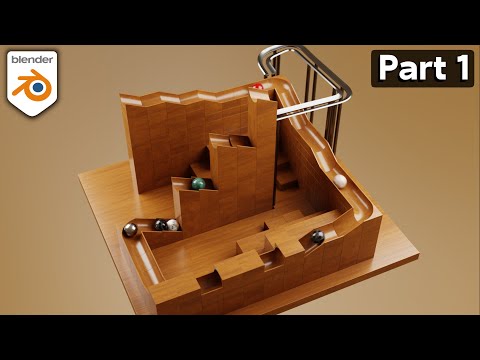
This Blender tutorial introduces the creation of a marble run animation using rigid body physics. The focus is on building a functional track system where marbles roll, bounce, and interact with obstacles in a physically accurate way. It combines modeling, physics simulation, and scene design to create an engaging dynamic animation.
The process starts with designing the basic structure of the marble track. Simple mesh objects like planes, ramps, and curved surfaces are used to guide the movement of the marbles. The track is built step by step to ensure smooth transitions and continuous motion without interruptions.
Once the structure is in place, rigid body physics is applied. The marbles are set as active rigid bodies so they respond to gravity and collisions. The track elements are assigned as passive rigid bodies, meaning they remain static but can interact with the moving marbles.
A key part of the setup is ensuring correct scale and transforms. Applying scale and rotation is essential so that physics calculations behave predictably. Without proper transforms, marbles may bounce incorrectly or pass through surfaces.
The tutorial also explores physics properties such as friction, bounce, and mass. These settings control how the marble interacts with different surfaces. High friction slows the marble down, while lower friction allows smoother rolling. Bounce adds energy to impacts, creating more dynamic movement.
As the marble moves through the track, gravity drives the motion naturally. The challenge is designing the environment so the marble maintains momentum without stopping too early or moving too fast. Small adjustments in slope and spacing greatly affect the final result.
The simulation is tested frequently during development. This iterative process helps identify problem areas where the marble might get stuck or behave unpredictably. Adjustments are made by tweaking collision shapes and refining geometry.
Baking the simulation is used to lock in the motion once everything behaves correctly. This ensures smooth playback and consistent results during rendering.


