AutoCAD Mechanical Project – Create a Saddle Bracket Step by Step
عدد الدروس : 6 عدد ساعات الدورة : 00:56:44 شهادة معتمدة : نعم التسجيل في الدورة للحصول على شهادةللحصول على شهادة
- 1- التسجيل
- 2- مشاهدة الكورس كاملا
- 3- متابعة نسبة اكتمال الكورس تدريجيا
- 4- بعد الانتهاء تظهر الشهادة في الملف الشخصي الخاص بك
قائمة الدروس
عن الدورة
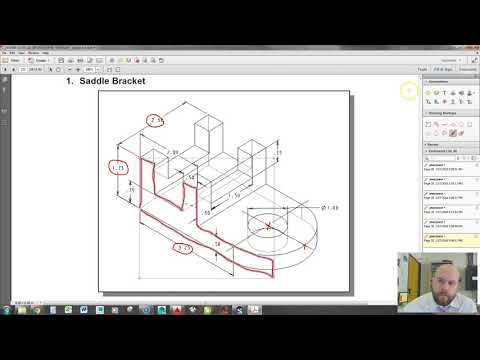
This AutoCAD Mechanical Drawing Course focuses on creating a real engineering component using Autodesk AutoCAD. The project-based approach helps you understand how technical drawings are built in professional workflows.
In this tutorial, you will learn how to design a saddle bracket step by step, starting from basic shapes and gradually building a complete mechanical component. The course emphasizes accuracy, proper dimensions, and clean drafting techniques.
You will use essential drawing commands such as lines, arcs, and circles to construct the base geometry. Then, you will apply modify tools like trim, extend, and offset to refine the shape. The tutorial also highlights the importance of precision using object snaps and alignment tools.
Additionally, you will learn how to add dimensions and annotations to make the drawing suitable for manufacturing or documentation. This is a key skill for engineers and designers working in mechanical fields.
This course is ideal for learners who want to move beyond theory and apply AutoCAD in real-world projects. By the end, you will be able to create detailed mechanical drawings and understand how to approach similar engineering designs confidently.


